

Welcome messages are an essential part of creating a welcoming and inclusive community on Discord. As a server owner or moderator, it's crucial to provide a warm and friendly introduction to new members as they join your server. A personalized welcome message can make all the difference in setting the tone for your community and establishing a positive first impression.
Having a welcome message on your Discord server is not only a polite gesture but also helps new members feel more comfortable and familiar with the server's rules and guidelines. It could also help them get to know the existing members of the community and build connections right from the start.
A well-written welcome message may be a powerful tool for highlighting the capabilities of your server and inspiring new users to participate in the community. It may also present well-known channels, provide links to useful resources, or advertise forthcoming events or activities.
In summary, a successful Discord server must have a well-designed welcome message. It can assist you in creating a healthy community, strong member relationships, and a friendly atmosphere for all.
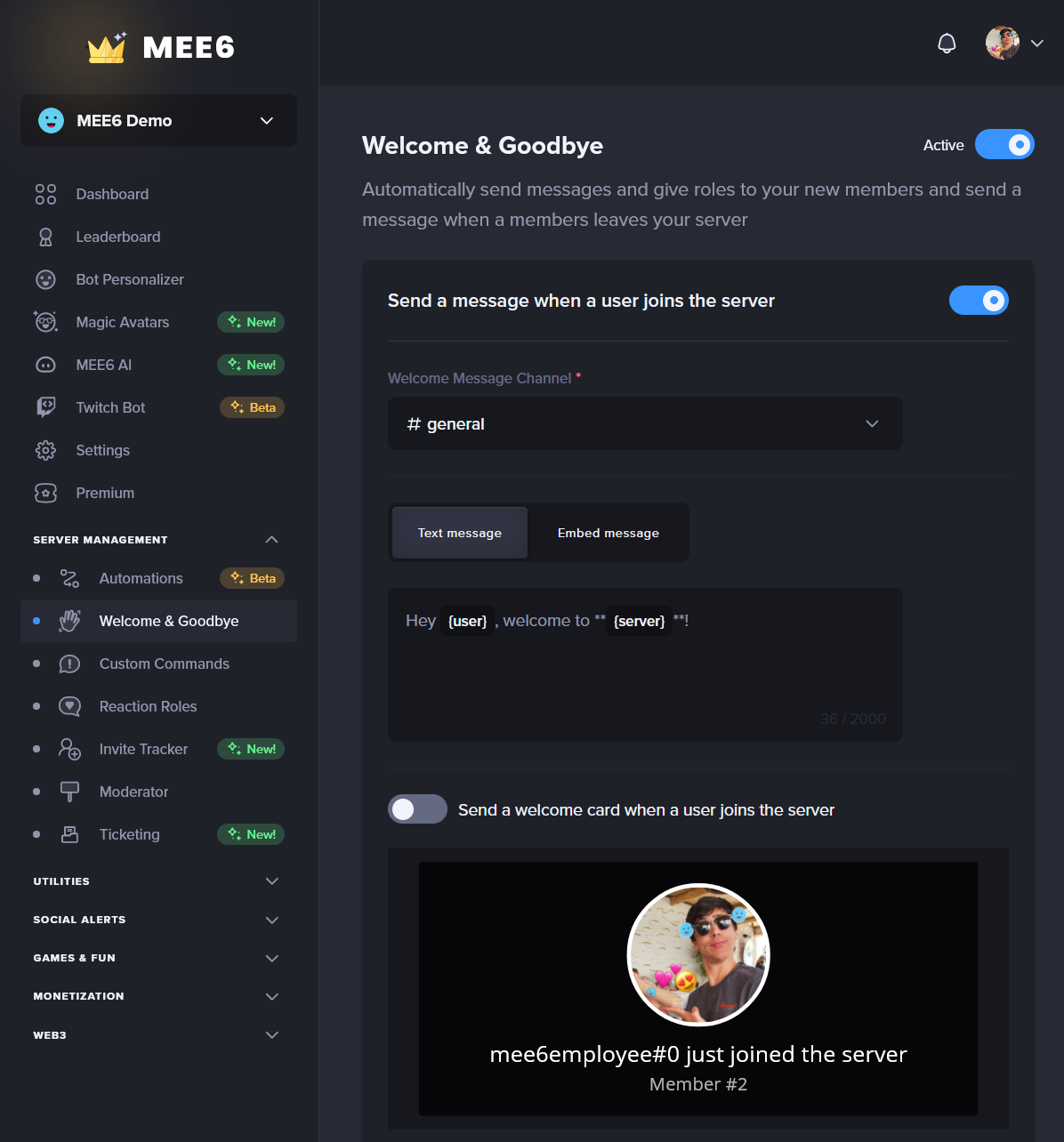
To create and send a Welcome & Goodbye on Discord with MEE6, follow these steps:
Go to the MEE6 dashboard (https://mee6.xyz/dashboard) and login into your Discord account, if needed.
Select the Discord server you want to set up the welcome message.
Click on the "Welcome & Goodbye" tab on the left-hand side of the screen.
Click the "Activate Welcome & Goodbye" button pop-up.

Now you can enable the welcoming public message: Enable the Send a message when a user joins the server and/or the "Send a private message to new users" toggle. Select the Welcome Message Channel and customize the message by editing the text in the text entry field. You can select if it's a text message or an embed, and you can use variables such as {user} and {server} to personalize the message. If it's an embed, you can preview the message by clicking the "Preview" button. Customize the message further by using the Send a welcome card when a user joins the server option, by setting a custom image and editing it to your liking. Don't forget to save your changes.
If you want, you can enable the Send a private message to new users and follow the steps you learned above. Disclaimer: This option is not recommended if you added a custom bot in the bot personalizer menu, and you have a high flow of newcomers as only verified bots can send private messages to a high number of Discord users.
Moreover, you have the option to automatically give out a role whenever a user joins and accepts the server rules (in case you turned the Discord built-in option). You just need to ensure MEE6 has the manage role permission, and that the role associated with it is above the role to be given out.
And lastly, you can empower your server with a farewell message by configuring the last option of the plugin.

That's it! MEE6 will now send your customized welcome message to new members who join your Discord server.
If you have any issues with the plugin, do not hesitate to join our support server! ✌️