

One of the most widely used communication tools for online groups is Discord. Users can interact and connect with people who have comparable passions and interests. However, it can be difficult to stand out and expand your server given the growing number of Discord servers and communities. Using the leveling plugin from MEE6 is one method to solve this problem.
MEE6 is a popular Discord bot that offers various features to enhance server management and engagement. Our leveling plugin is one of the most useful tools for growing a community on Discord. It allows server owners to create a leveling system based on the activity of their members. The more active a member is on the server, the higher their level becomes. This system provides several benefits for growing your Discord community:

Encourage engagement
The leveling plugin from MEE6 encourages members to be more active on your server. It creates a sense of competition among members to reach higher levels, which motivates them to engage in conversations, participate in events, and contribute to the community. This increased engagement leads to a more active and vibrant server, which in turn allows you to keep attracting more and more members.
Reward loyal members
The leveling system rewards members who are consistently active on the server by awarding them XP (experience points) for every message they send. As they accumulate more XP, they level up and unlock new perks and rewards. This system recognizes and acknowledges the contributions of loyal members, which helps retain them in the community!
Foster a sense of community
The leveling plugin from MEE6 creates a shared experience among members. They all work towards a common goal of leveling up and unlocking new rewards, and they all go through the same experience. This shared experience fosters a sense of community and belonging, which is essential for the growth and sustainability of any Discord server. Members feel invested in the community and are more likely to stick around, get involved and contribute to its growth.
Provide a way to measure activity
The leveling system provides a way to measure the activity of your members. You can track how many messages they send and see on what level they are. This data can help you identify which members are the most active and engaged. You can then reach out to them, recognize their contributions, and encourage them to become more involved in the community.
How to enable leveling on my Discord server
Adding MEE6 to your server: Go to the MEE6 dashboard and login into your Discord account, if needed. Then select the Discord server you want to set up the Levels for.
Enabling the Levels Plugin: Now that you have the bot in your server, you want to go to the Levels plugin, located on the plugin's sidebar, and enable it.

Configuring the Levels plugin: There are many options here for you to configure the bot to your liking.
Leveling Up: Here you can set a channel and make custom messages when your users level up. You can use variables such as {player} and {level} to personalize the message.

Role rewards configuration: Here you can reward your members with roles upon reaching specific levels, with the added option to stack the roles or remove them when a new role is added.

Default server rank card: Here you can change your server members /rank cards.

XP Rate: Here you can set a custom XP earn rate.

No-XP Roles: Here you can edit who can and can't earn XP, this is done via roles.

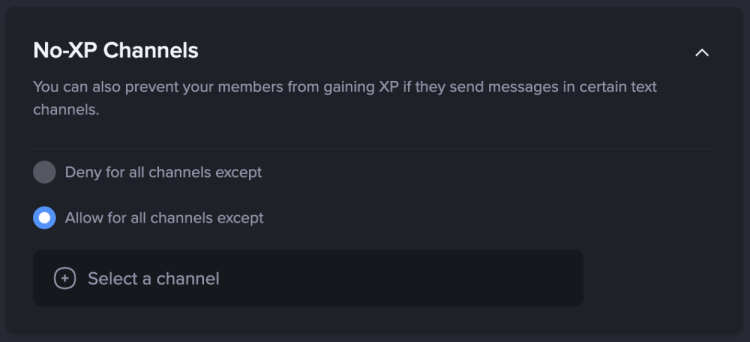
No-XP Channels: You can stop people from earning XP in certain channels.
Commands: You also have access to managing the commands that are available on your server.

Each command can be set up to your liking, with a variety of options to choose from: who can use it, in which channels and how does the command behave when used.

And.. that is it! Your leveling system is now ready to be used by our server members. You can always come back to the dashboard to make changes whenever you want.


Frequently Asked Questions - Levels Plugin
Can I manually give XP to someone?
Yes, you can unlock premium, visit your server, and type /give-xp filling out the required fields, to remove, use the /remove-xp command. Note: Removed XP cannot be recovered by MEE6 Team, so you will need to use /give-xp command.
How can I delete all members' XP?
Thanks to the leaderboard you can do that with just a few clicks:
1) Visit your leaderboard (you can type /levels or visit https://mee6.xyz/dashboard/ -> leaderboard -> see leaderboard) 2) Locate the admin tool, and remove all XP. Remember, this is not reversible!
Can we reward people for chatting?
Certainly yes! You can visit your dashboard, click on the Levels plugin, and fill out the Role rewards configuration to encourage your community to engage.
If you have any issues with the plugin, do not hesitate to join our support server! ✌️