Event Scheduler Discord bot
Event Scheduler
No code needed. Try it in your browser before adding it to Discord.
What it does
Event Scheduler
Schedule events with live RSVP tracking and automatic reminders.
Commands:
/event create— Create a new event with title, date/time, and optional weekly repeat/event list— See all upcoming events
Features:
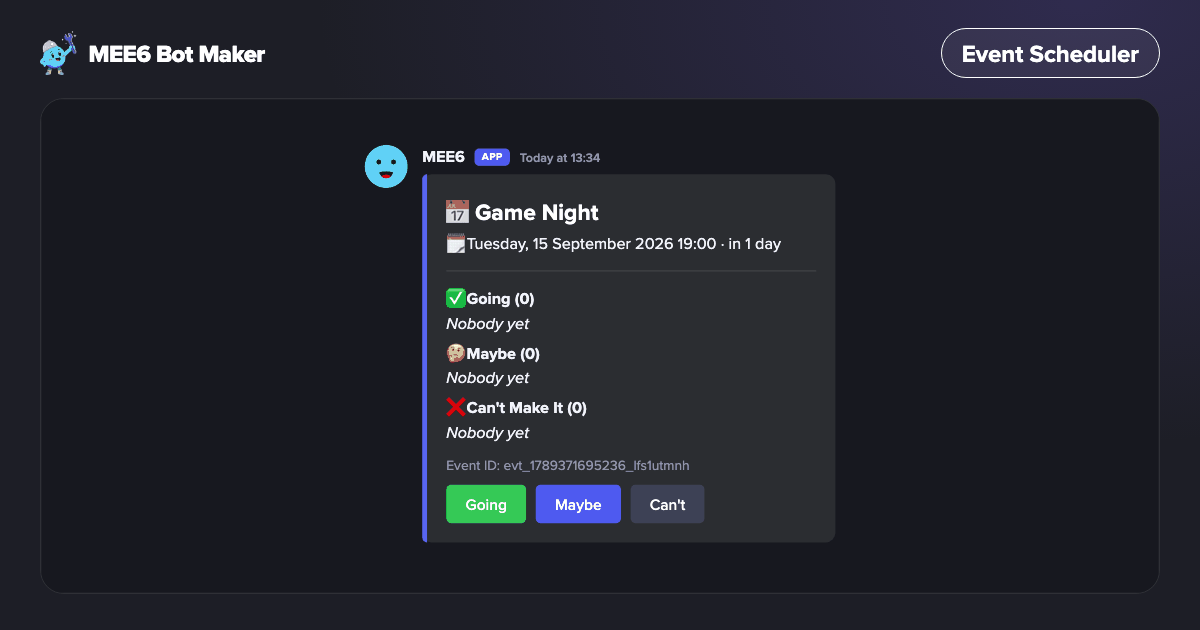
- Each event is one card that updates in place: title, date and countdown, then who is Going, Maybe or Can't with counts
- Going/Maybe/Can't buttons that update the attendee list live
- The card closes once the event has taken place
- Automatic reminder 15 minutes before that pings Going members
- Weekly events repost automatically with reset RSVPs
- Supports date formats like "2024-12-25 18:00", "tomorrow 7pm", "next friday 8pm"
Setup: Set the event announcements channel in settings.
Commands
/event createCreate a new event with RSVPs/event listShow upcoming events
Add Event Scheduler to your server
Log in with Discord
Sign in with your Discord account and choose the server where you want it.
Try it here
Play with commands, buttons and replies in a simulated Discord server, right in your browser. Your real server stays untouched.
Add it to your server
Choose your server, check the settings and add your module. Want something different? Just ask MEE6 to change it.
The prompt behind it
Add /event create with a title, a date and time and an optional weekly repeat, which posts one Components V2 card in a channel I choose, updated in place: a heading with the title, the date and a countdown, a separator, who is Going, Maybe and Can\'t with counts, and the Going, Maybe and Can\'t buttons inside the card; it closes once the event has taken place. It pings the Going members 15 minutes before, and /event list shows what is coming