Rules Panel Discord bot
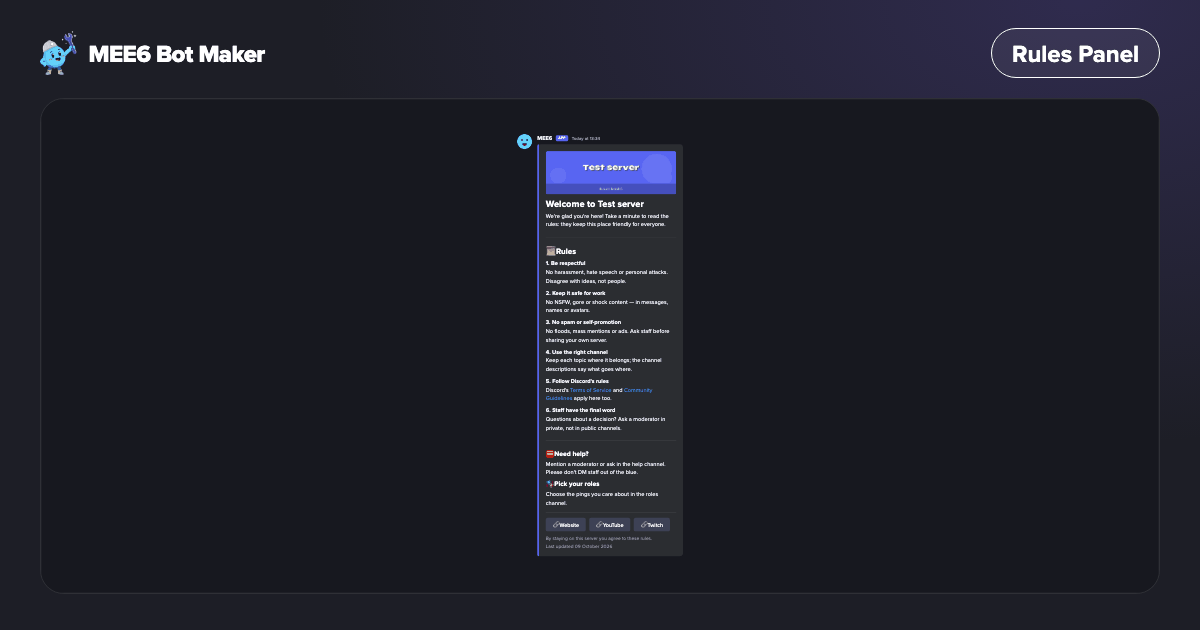
The rules-and-info post every server pins, built with Discord's new message layouts: a banner, a big welcome heading, your rules as a numbered list, a few info sections, link buttons to your website and socials, and small print with the date it was last updated.
No code needed. Try it in your browser before adding it to Discord.
What it does
The rules-and-info post every server pins, built with Discord's new message layouts: a banner, a big welcome heading, your rules as a numbered list, a few info sections, link buttons to your website and socials, and small print with the date it was last updated.
How to use:
- Write your rules, info sections and links in settings, and pick the panel channel
- Members with the staff role run
/rulespanelto post the card - Changed a rule? Run
/rulespanelagain: the same card is edited in place, no second post and no lost link - Paste a banner picture URL, or leave it empty for a banner drawn with your server's name
Commands
/rulespanelPost or update the rules and info card
Add Rules Panel to your server
Log in with Discord
Sign in with your Discord account and choose the server where you want it.
Try it here
Play with commands, buttons and replies in a simulated Discord server, right in your browser. Your real server stays untouched.
Add it to your server
Choose your server, check the settings and add your module. Want something different? Just ask MEE6 to change it.
The prompt behind it
Add /rulespanel which posts the server's rules and info as one Components V2 layout card in a channel from settings: a banner picture in a gallery at the top (a URL from settings, or one drawn with mee6.draw from the server name and icon when none is set), a # heading with an intro (the server icon as a thumbnail beside it), the rules from a list setting as numbered text blocks, separators, a few info sections from another list, up to five link buttons (website, socials) from a list setting, and a -# small print footer with the last update date. Only a staff role from settings can run it, and running it again edits the existing card in place instead of posting a new one. Check Discord's 4000-character limit before sending.