Role Panel Discord bot
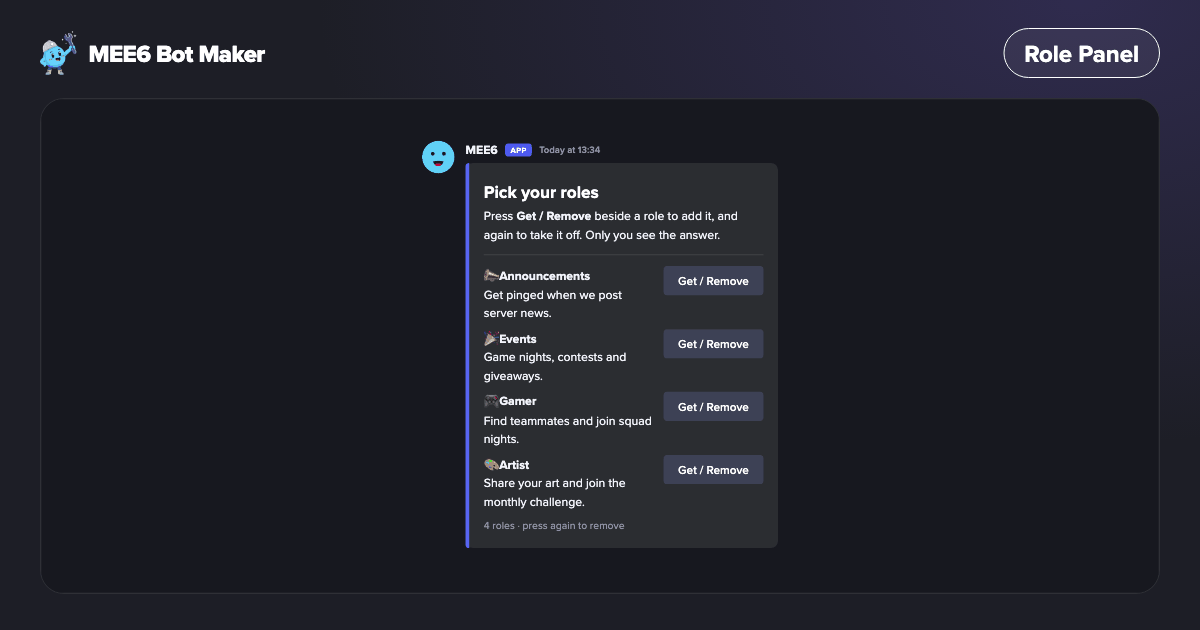
A role panel built with Discord's new message layouts: one card with a heading, then each role on a line of its own with its emoji, its description and a Get / Remove button on the right. Members press it to take the role and press it again to give it back; the answer is private, so the channel stays clean.
No code needed. Try it in your browser before adding it to Discord.
What it does
A role panel built with Discord's new message layouts: one card with a heading, then each role on a line of its own with its emoji, its description and a Get / Remove button on the right. Members press it to take the role and press it again to give it back; the answer is private, so the channel stays clean.
How to use:
- In settings, list the roles to offer (up to 12) with an emoji and a short description, and pick the panel channel
- Members with the staff role run
/rolepanelto post the card - Run
/rolepanelagain after changing the list: the same card is updated in place - Keep
/rolepanelopen to everyone in its command permissions — the panel's buttons follow the same rules, and the command already checks the staff role itself
Commands
/rolepanelPost or refresh the role panel
Add Role Panel to your server
Log in with Discord
Sign in with your Discord account and choose the server where you want it.
Try it here
Play with commands, buttons and replies in a simulated Discord server, right in your browser. Your real server stays untouched.
Add it to your server
Choose your server, check the settings and add your module. Want something different? Just ask MEE6 to change it.
The prompt behind it
Add /rolepanel which posts a self-assignable role panel as a Components V2 layout: one container with a ## heading and an intro, then one section per role with its emoji, name and description, and a Get / Remove button on the right that toggles the role for whoever presses it and answers privately ("You now have @Role" / "Removed @Role"). The roles and their descriptions come from a list setting (role, emoji, description; at most 12, so the card stays under Discord's 40 components). Only members with a staff role from settings can run it; running it again edits the existing panel in place instead of posting a new one.