Nickname filter Discord bot
Automatically kicks members who join with banned words in their nickname and logs the action to a mod channel.
No code needed. Try it in your browser before adding it to Discord.
What it does
Automatically kicks members who join with banned words in their nickname and logs the action to a mod channel.
Setup
Configure two settings in the dashboard:
- Mod log channel — where kick logs are posted (e.g., #mod-logs)
- Banned words — comma-separated list of words to filter (e.g.,
spam,scam,hack,bot)
How it works
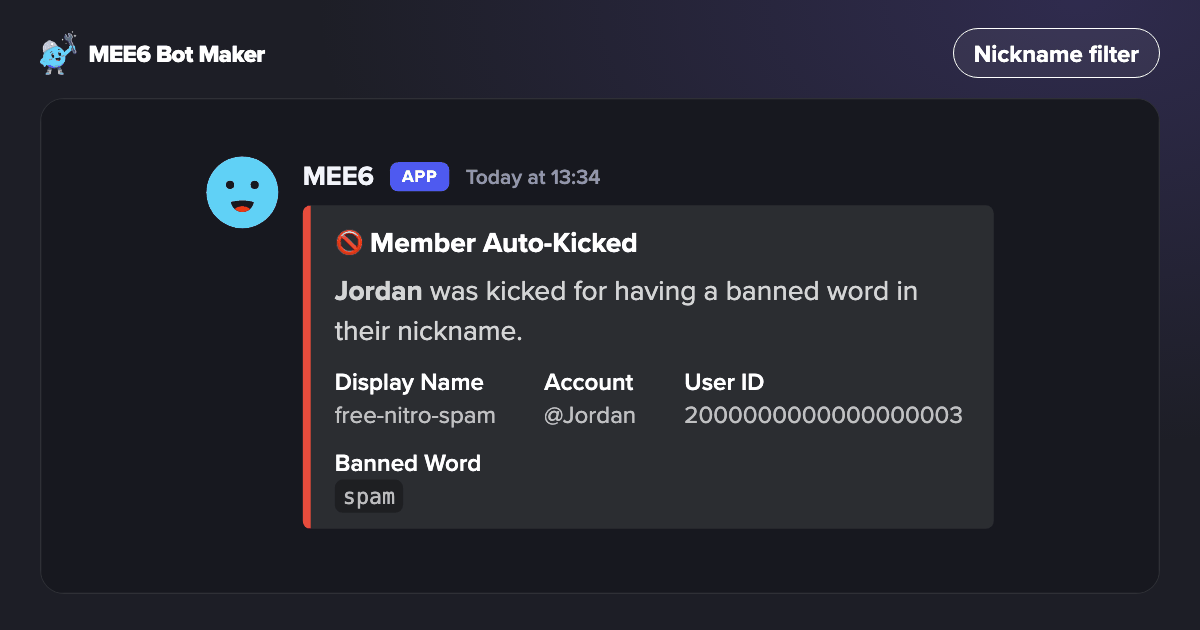
When a member joins, their display name is checked against the banned words list (case-insensitive). If a match is found, they're immediately kicked and a log embed is posted showing:
- Their username and display name
- Their user ID
- Which banned word triggered the kick
- A timestamp
The bot needs Kick Members permission to function.
Add Nickname filter to your server
Log in with Discord
Sign in with your Discord account and choose the server where you want it.
Try it here
Play with commands, buttons and replies in a simulated Discord server, right in your browser. Your real server stays untouched.
Add it to your server
Choose your server, check the settings and add your module. Want something different? Just ask MEE6 to change it.
The prompt behind it
When a member joins with a banned word in their nickname, kick them and log it in #mod-logs with their name and account